Ceiling vs. wall mount: choosing where to install your Avia device
Which mount type fits your entrance, and the requirements for each.
Avia supports both ceiling and wall mounting. The right choice depends on your store's physical layout and the position of your entrance.
Ceiling mount (recommended)
Ceiling mounting is the preferred option where possible. A ceiling-mounted device looks directly down into the entrance, giving the widest and most symmetrical field of view.
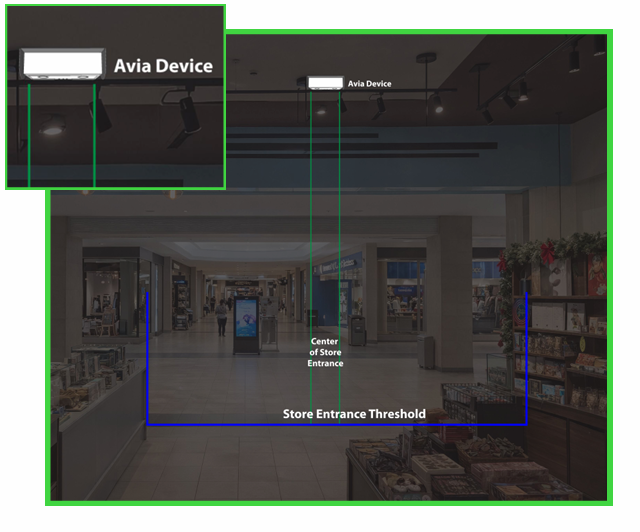
Best for:
Standard retail entrances with overhead clearance
Locations where wall space is limited or obstructed
Requirements:
Ceiling height between 2m and 5.5m
Device mounted directly above or within 30cm of the center of the doorway
Clear sightline downward: no signage, railings, or fixtures blocking the view
Wall mount
Wall mounting is used when ceiling access is not available or practical, for example in entrances with very high ceilings, glass atriums, or structural constraints.
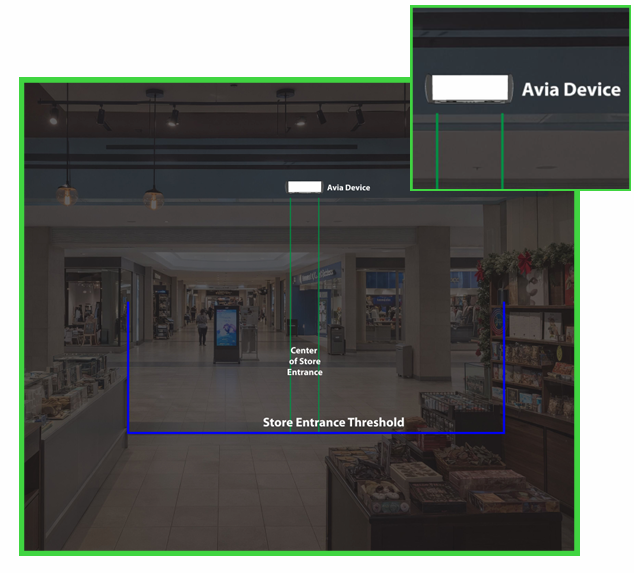
Best for:
Atriums or spaces with ceilings above 5.5m
Entrances where a ceiling mount would be off-center
Retrofits where ceiling cabling is not feasible
Requirements:
Mounted on the wall above the entrance, angled downward
Height between 2m and 5.5m (measured to the device, not the ceiling)
Device aimed toward the center of the doorway
Key differences
Warning: Your mount type determines how to measure the installation height you enter during registration: ceiling mount = floor to the bottom of the device; wall mount = floor to the centre of the device. An incorrect height affects counting accuracy.
Related articles
Need help?
If you are not sure whether to use ceiling mount or wall mount, contact Avia support at avia.support@retailogists.com and include:
Store name
Device serial number, if available
Installation height
Photos of the entrance area
Photos of the ceiling or wall where the device may be installed
Was this helpful?
Still need help? Ask the team